Introducing The Training Board - Plan Your Training Week in Minutes, Not Hours

EquineOps
Feb 28, 2026
Every trainer knows the feeling. It's Sunday night, and you're staring at a whiteboard (or a notebook, or a pile of sticky notes) trying to map out who rides what this week. Thirty horses across seven days, different riders, different exercises — and by Tuesday, half the plan has already changed.
The Training Board in EquineOps was built to replace that whiteboard with something better.
Your Week at a Glance
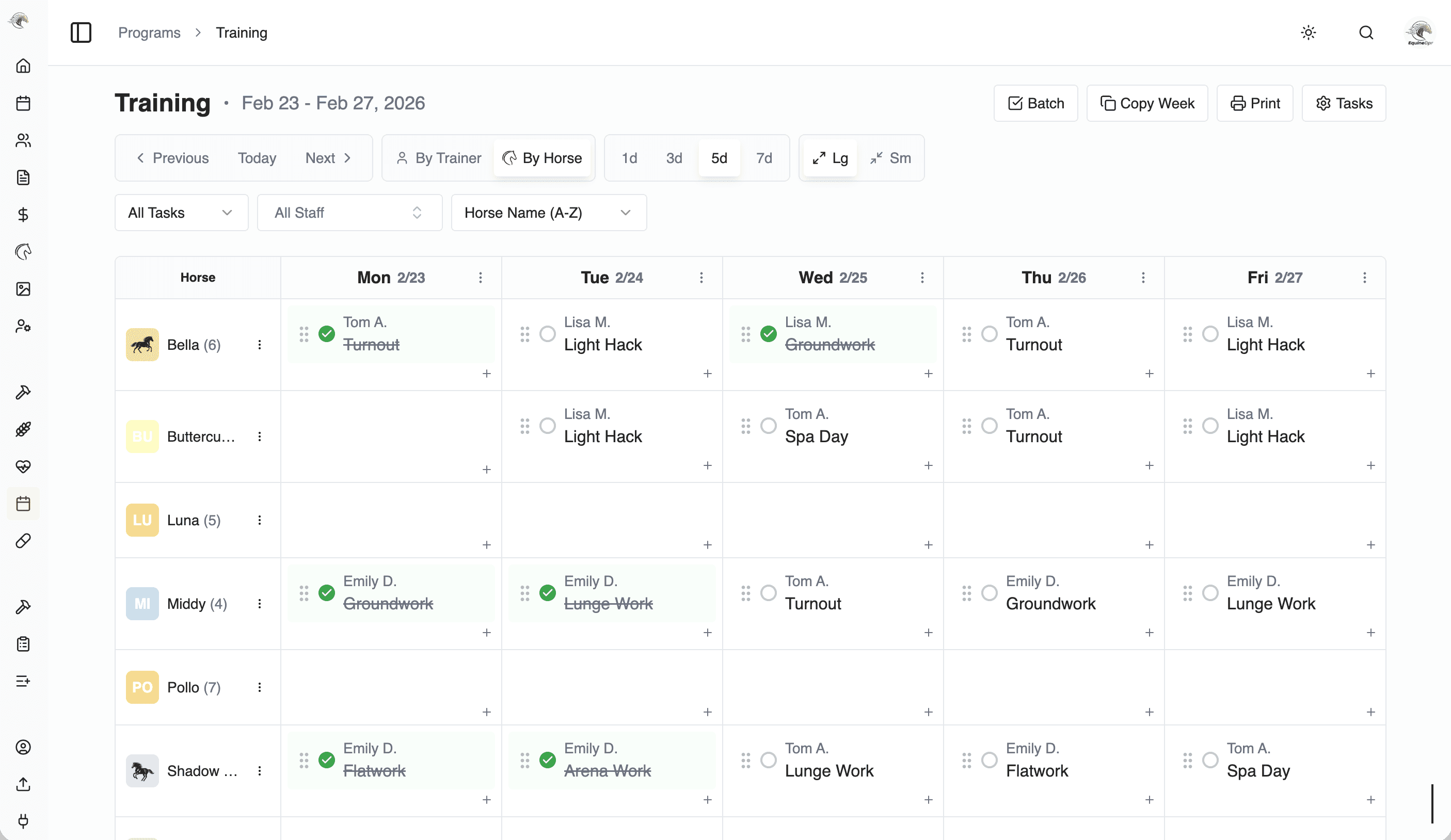
The Training Board is a simple grid. Horses go down the left side. Days of the week go across the top. Each box is one horse on one day. That's it.
Want to know what's planned for Dusty on Wednesday? Find his row, look at Wednesday. Want to see everything happening on Friday? Scan down the Friday column. No clicking through menus or opening separate pages.
On your phone, it works a little differently — you pick a day at the top and scroll through your horses. Same information, just laid out for a smaller screen.
Fill It In Fast
Click on any empty box and start typing. EquineOps suggests common tasks like Flatwork, Jumping, Lunge Work, Trail Ride, Turnout, or Day Off — and it learns what you use most, so your favorites show up first.
You can also assign a staff member to each entry. That way, your riders know exactly which horses they're on each day without having to ask.
Copy Instead of Retyping
Here's where the real time savings kick in. If your horses follow a similar schedule week to week, you can copy last week's entire plan to this week with one click. Just tweak what's different and you're done.
Need Tuesday's plan to carry over to Wednesday? Copy a single day forward. You can even copy just one horse's day if that's all you need.
No more rewriting the same schedule over and over.
Check Things Off as You Go
As each training session gets done, mark it complete right on the board. By the end of the day, you can see exactly what got done and what didn't — no guessing, no asking around.
Every Horse Shows Up Automatically
You don't have to add horses to the Training Board. Every active horse in your barn is already there. If you have a horse that doesn't need to be on the board (maybe they're on stall rest or just arrived), you can exclude them so they're not cluttering up your view.
Why Trainers Love It
The Training Board replaces the messy back-and-forth of planning a training week. Instead of a whiteboard that only one person can see, you get a shared schedule that your whole team can access from their phones.
Here's what changes when you start using it:
Sunday planning takes minutes, not an hour. Copy last week, make adjustments, done.
Your riders know the plan before they ask. No more morning huddles just to figure out the schedule.
You know what actually happened. Completion tracking means you can look back and see the real training history, not what you hoped would happen.
Changes happen in real time. If a horse needs a day off mid-week, update the board and everyone sees it instantly.
Give It a Try
The Training Board is included in every EquineOps plan. Start your free 14-day trial and see how much easier your training week can be.
Get started at app.equineops.com